free-plc-training · South Africa
Free PLC Training: Resources and a Practical Study Plan
Find free PLC training resources for South African learners, with a practical study sequence, vendor links, access checks and ways to document your work.

Free PLC training can provide a useful start in control logic, vendor terminology and software practice. You do not need to buy a course before learning to predict a simple output, read an introductory manual or try an appropriate exercise. The important questions are what the resource includes, whether you can practise independently and what evidence you retain from the work.
For South African learners, a practical starting combination is an introductory lesson, a suitable free practice environment and a small notebook of predictions and results. Official vendor resources can add platform detail. There is no evidence-based rule that free resources stop at one universal skill level, or that paying for a course automatically creates competence.
This site is commercially connected to PLC Simulator, which has free and paid access. We link it where its practice tools fit the learning task, and include other sources so that you can compare approaches. Check the current free and paid product access before building a study plan around a particular feature.
Free learning resources worth investigating
The following resource pages were checked on 11 September 2026. Their formats and access conditions differ. A publicly available lesson does not necessarily include an engineering software licence, a physical training kit, individual tutoring or a recognised qualification.
| Resource | What the source offers | What to check for your study plan |
|---|---|---|
| AutomationDirect PLC training | Free video libraries covering PLC fundamentals and its controller families | Which software or equipment a particular exercise uses |
| Mitsubishi Electric English e-learning | A catalogue including beginner PLC topics, programming and product-specific lessons | Online and downloadable availability for the selected module |
| PLC Simulator free access | Selected browser learning and practice, with paid plans for additional access | Current exercise availability, saving limits and account requirements |
| Official product manuals and application examples | Documentation for a named controller, instruction or software version | Whether the example matches your exact product and revision |
| Public technical videos and written tutorials | Explanations and demonstrations from a range of authors | Accuracy, publication date, prerequisites and a way to test the explanation |
AutomationDirect's free PLC training page identifies free video learning covering fundamentals and its PLC families. Treat it as an international online resource; this does not establish local classroom availability or South African qualification recognition. A training video and the equipment demonstrated in it are separate things to evaluate.
Mitsubishi Electric's English e-learning catalogue lists beginner PLC lessons alongside ladder, structured text, engineering software and maintenance topics. Availability varies by module and format. Some resources have downloadable editions; do not infer that every lesson or programming environment works offline.
For Siemens documentation, use the official industry support portal and identify the product and software version before applying an example. Documentation can be valuable free study material, but it is not automatically a sequenced beginner course with feedback. Keep the distinction between reading about a feature and demonstrating your own use of it.

Free access, a free trial and a free certificate are different
A free access tier usually defines a set of features available without a subscription charge under its current terms. A trial provides temporary access, often to a larger paid product. A freely viewable course may charge separately for assessment or a certificate. Read the actual offer rather than relying on the word “free” in a search result.
Before registering, check whether a payment card is required, whether access expires and whether any recurring charge begins automatically. Check software and equipment requirements too. A lesson can have no tuition fee while still requiring a compatible computer, a paid engineering package or hardware you do not own.
For a certificate, ask what the document records. Was there an assessment? Did it test your own project or only recall of lesson content? Who issues it, and what does the organisation requesting evidence accept? A free certificate is not inherently worthless, and a paid one is not inherently a qualification. Evaluate the particular evidence and intended use.
Keep a simple access record for each resource: its URL, the date you checked it, the module name and the conditions relevant to your plan. This is especially useful when a bookmarked promotion changes or when a colleague follows a different regional version of a vendor website.
What you can learn before buying anything
Start with the distinction between a signal's meaning and the value a program currently sees. In a software exercise, SamplePresent might be a Boolean variable you control with a button. That does not prove a real sensor is wired correctly or that the value is fresh. Naming assumptions helps prevent an attractive diagram from doing more explanatory work than it should.
Then learn to predict simple logic. You should be able to explain why two conditions connected by AND require both to be true, and why OR behaves differently. The ladder logic foundations lesson provides a worked virtual example. Write predictions before running it so that a surprising result becomes something you investigate.
Next, distinguish an instantaneous condition from stored state. A counter's accumulated value or a retained sequence step depends on previous events. Reset and initial conditions therefore matter. A free lesson that makes these ideas clear can be useful even if its interface looks less polished than a paid course.
You can also learn to read documentation, create a short test table and describe an uncertainty precisely. These habits cost no tuition fee and support later instruction. They do not depend on owning a physical PLC, although applying them to real equipment introduces additional technical and practical requirements.
For the wider pathway, use the South African PLC training guide. It helps you identify whether your next need is general logic, a particular vendor workflow or supervised practical training. Free resources can contribute to any stage when their scope matches the task.
A first exercise: count events, not repeated observations
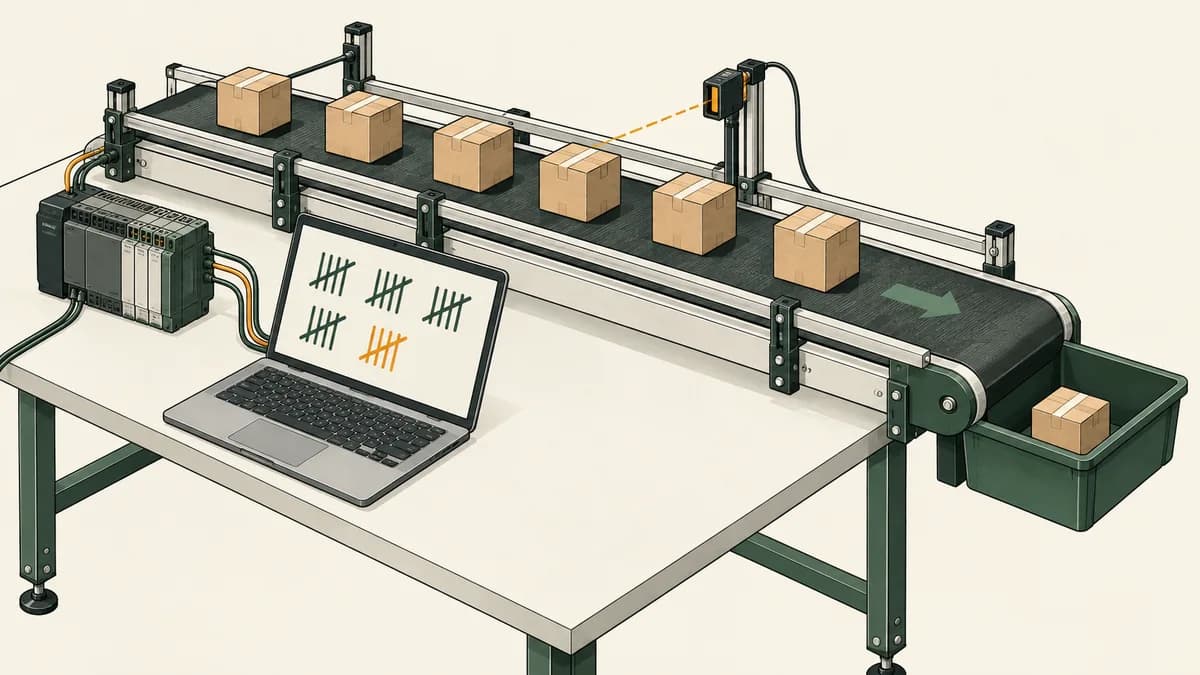
This fictional software exercise introduces state without controlling machinery. Imagine a virtual item indicator that can be false or true. Count a new item only when the indicator changes from false to true. Holding it true across several evaluations must count once, not once per evaluation.
Define the starting values explicitly: PreviousPresent is false and Count is zero. On each evaluation, a new event occurs when Present is true and PreviousPresent is false. Increase Count by one for that event. After evaluating the event, store the current Present value in PreviousPresent for the next evaluation.
| Evaluation | Present | PreviousPresent before evaluation | New event? | Count afterwards |
|---|---|---|---|---|
| 1 | False | False | No | 0 |
| 2 | True | False | Yes | 1 |
| 3 | True | True | No | 1 |
| 4 | False | True | No | 1 |
| 5 | True | False | Yes | 2 |
| 6 | False | True | No | 2 |
| 7 | True | False | Yes | 3 |
The expected final count is three. If your result is four, investigate whether you incremented whenever Present was true instead of detecting its transition. If the count never changes, check whether you updated PreviousPresent before calculating the event, erasing the difference you intended to detect.
This is a logical model for study, not a claim about a particular vendor counter instruction. A physical system may introduce missed pulses, filtering, communication delays and specialised counting hardware. None of those behaviours is represented in this seven-evaluation example.
Add one variation only after the first version works: begin with Present already true while PreviousPresent remains false. Under the stated model, the first evaluation counts an event. If you want a different startup policy, write that requirement before changing the implementation. This is an opportunity to learn that a program's correctness depends on the brief, not simply on whether a number increases.
A free study sequence with evidence at each step
Use the following sequence at a pace that fits your starting knowledge. It is a suggested learning structure, not a promise of competence after a fixed number of days. Repeat a step when your explanation still depends on looking at the solution.
First, choose one introductory source and one practice environment. Confirm that you can open the lesson, control the example inputs and read the output. Keep your first task small. Switching between several platforms before understanding their controls can make interface differences look like logic errors.
Second, predict a simple condition on paper. Record all the input combinations relevant to the brief. Run the example and compare the observations with your predictions. If they disagree, write the mismatch in a sentence before changing anything. This makes the investigation easier to review later.
Third, try the event-counting task above using an environment that supports the required state. Explain what PreviousPresent means and when it changes. If the tool provides a built-in counter or edge instruction, read its documentation before assuming its behaviour matches the explicit model.
Fourth, reconstruct the task without opening the previous project. Keep the written requirement available, because remembering a diagram is not the same as implementing a brief. Compare the two versions by behaviour and explain any differences in structure.
Fifth, create one new test that the original table did not include. Consider a different starting state, a longer sustained input or repeated false values. Write the expected result first. Adding a justified test is a useful sign that you are reasoning about the model rather than only following instructions.
Finally, review your remaining questions. Decide whether another free explanation, relevant documentation, a tutor or a practical course is the best next source of help. The online PLC course guide explains the different kinds of feedback available through remote learning.
Using videos actively
A video can explain a concept, show an unfamiliar interface or demonstrate a diagnostic workflow. Its usefulness depends partly on what you do with it. Pause before the result, predict what should happen and attempt a comparable small task yourself where the software and instructions permit it.
Retain the video's product name, version and assumptions. A lesson using one controller family may demonstrate instructions or project settings that differ from your environment. When you see a discrepancy, find the relevant documentation instead of copying symbols until the screens look alike.
Ask whether the author explains failure cases as well as the normal demonstration. A short lesson showing an unexpected result and a reasoned correction may teach more about investigation than a long uninterrupted presentation of finished code. That does not mean a video must include every possible fault to be useful; its scope should simply be clear.
Avoid treating footage of physical work as permission to reproduce it on equipment. Use the appropriate supervision and equipment-specific procedures for practical tasks. For software study, you can still analyse the stated logic and record questions about the parts the video does not explain.

Study from home in South Africa without guessing the costs
Free tuition does not mean there are no study costs. Consider your device, internet access and any required software separately. Use the computer and connection you actually plan to study with when testing a resource. A successful page view on a phone does not establish that a diagram editor will be comfortable to use there.
For learners in Gauteng, the Western Cape, KwaZulu-Natal or elsewhere, an international online resource may be accessible without travelling to a training venue. That is different from having local tutor support or local practical facilities. Check these separately if you need live help or equipment access.
If mobile data is limited, try a representative lesson and measure usage on your own connection. Video, remote desktop and browser simulations have different traffic patterns, and this guide does not supply an unmeasured data-per-hour promise. Look for legitimate downloadable reading material when it suits your study plan.
An offline PDF lets you study explanations and diagrams without a live connection. It does not necessarily include an offline programming environment. Check the exact file format and device requirements before downloading, particularly when a vendor offers both executable and document editions.
For a learner sharing a family computer, keep a realistic schedule and avoid assuming that saved work is private simply because the lesson is educational. Use your own account where appropriate, sign out on shared devices and retain permitted copies of your learning notes. Confirm the tool's saving limits before relying on it as the only place your work exists.
How to keep a useful learning portfolio for free
A portfolio can begin as your own folder of briefs, predictions and observations. You do not need an elaborate certificate design to document an exercise. Keep the original task, environment and version, expected behaviour, observed result and a short explanation of the correction you made.
For the event-counting example, retain the seven-row test table and explain why sustained true values do not create additional events. Add the startup variation and state which policy your program implements. Someone reviewing the work can then ask meaningful questions about your reasoning.
Be clear about provenance. Identify work you attempted independently, examples you adapted and any assistance you received. Do not present a vendor's finished sample as your own original project. If you share project files or screenshots, respect the source's terms and avoid including private workplace information.
A product's export or reporting feature can make this easier, but it is not the only way to retain learning evidence. Check current plan availability rather than assuming every export is free. The associated product's curriculum overview helps you compare guided exercises with your own study notes.
A portfolio supports a conversation about what you learned. It does not establish every skill required for a job, a formal qualification or permission to work on machinery. Ask the intended reviewer what evidence would be useful, and describe the software-only nature of a simulation honestly.

When paying for training is a sensible next step
Consider paying when you can name the missing capability. You may need feedback on your own reasoning, access to a specific engineering package, supervised equipment time or a course assessment requested by your employer. A purchase is easier to evaluate when it solves a defined gap.
If your difficulty is a basic condition, another explanation and a small test may be enough. If you have repeatedly tried a task but cannot identify why it fails, individual feedback may be valuable. If your task involves physical measurement, a browser exercise cannot supply all the practical experience you need.
Compare the intended benefit with the complete payable amount. A subscription, a block of live tuition and a classroom programme have different billing and attendance commitments. The PLC course pricing guide includes dated provider examples and itemised budgeting exercises. Do not assume the most expensive offer is best, or that free learning must be abandoned once you purchase something.
For additional software practice, inspect the relevant product preview before upgrading. The motor-control learning preview is one way to evaluate the exercise format. Confirm current access and choose a plan only if it contains practice you intend to use.
Questions about free PLC courses and resources
Is there completely free PLC training online?
Yes. The official resources linked above include freely available learning, and the associated simulator offers selected free access. Check the specific module and its requirements. Free teaching content does not automatically include hardware, commercial software, tutoring or a certificate with a particular form of recognition.
Can I learn PLC programming at home without a PLC?
You can study logic and complete suitable software exercises without owning a controller. Choose an environment that supports the task and document its assumptions. Hardware configuration, measurement and workplace troubleshooting introduce additional requirements. Plan the practical component when your intended outcome needs it.
Are free PLC certificates recognised in South Africa?
Recognition depends on the specific document and the organisation assessing it. Ask who issues it, what assessment it represents and whether it meets the recipient's requirement. Do not infer formal qualification status from a logo or the word “certificate”, and do not assume a fee determines the value of the evidence.
Is free Siemens or Mitsubishi training enough for my job?
Compare the resource with the actual task and equipment. An introductory lesson can support preparation, while a role may require a particular engineering workflow and supervised practical experience. The Mitsubishi learning guide explains platform questions to investigate before treating a general lesson as complete job preparation.
Can I get free PLC training with no installation?
Some browser learning and practice can be used without installing a native engineering package. Confirm the resource's browser, account and device requirements. A video demonstrating installed software does not necessarily provide an equivalent browser exercise, and a downloadable document is not an executable simulator.
What should I do when a free tutorial is confusing?
Reduce the example to one question. State the expected output, inputs and initial conditions, then test a small case. Check whether the tutorial uses the same instruction and software version as your environment. The fault-finding workflow guide provides a structure for recording observations before changing the program.
How long should I use free resources before paying?
Use progress and your next requirement to decide, rather than an arbitrary deadline. If you can still identify useful free exercises and review the results, continue. If you need a capability or feedback arrangement that the current resources do not provide, compare paid options against that specific gap.

Start with one testable question
Choose a small learning task and write what should happen before opening a solution. Use an appropriate free resource, retain the result and explain any correction. Then decide which question to investigate next. This approach gives you useful evidence about your progress and helps you choose further training with a clearer purpose.